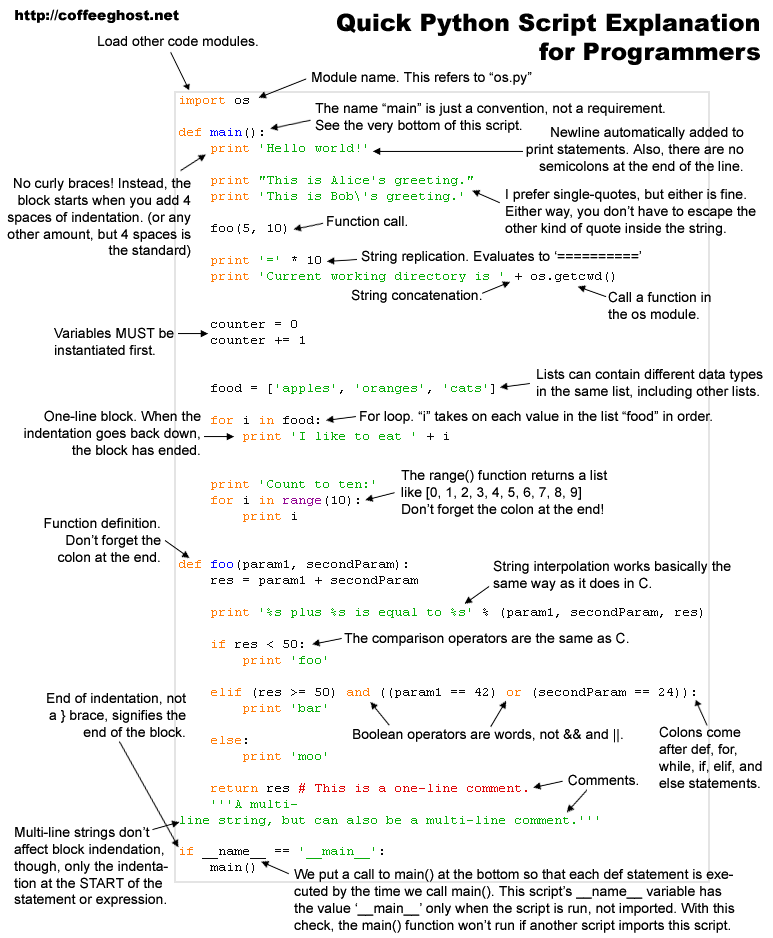
Writing the first program with python
Assuming you’ve got Python installed, fire up a shell window and type
python to start the interpreter. Here’s a simple script. Just type print 'hello world' and hit return.
now lets go through the code, print is a built in python function which takes string values as
an input and writes what ever the input parameter in to the standard output which is the monitor.
Any time you want feedback from Python, use the
print statement. As with any language, Python has built-in tools for doing common things, like in this case, printing something out.Built-in Functions
The Python interpreter has a number of functions built into it that are always available. They are listed here in alphabetical order.- abs (x) -- built-in function
- Return the absolute value of a number. The argument may be a plain or long integer or a floating point number.
- apply (function, args) -- built-in function
-
The function argument must be a callable object (a user-defined or
built-in function or method, or a class object) and the args
argument must be a tuple. The function is called with
args as argument list; the number of arguments is the the length
of the tuple. (This is different from just calling
func(args), since in that case there is always exactly one argument.)
- chr (i) -- built-in function
-
Return a string of one character whose ASCII code is the integer
i, e.g.,
chr(97)returns the string'a'. This is the inverse oford(). The argument must be in the range [0..255], inclusive.
- cmp (x, y) -- built-in function
-
Compare the two objects x and y and return an integer
according to the outcome. The return value is negative if
x
< y
, zero ifx == yand strictly positive ifx > y.
- coerce (x, y) -- built-in function
- Return a tuple consisting of the two numeric arguments converted to a common type, using the same rules as used by arithmetic operations.
- compile (string, filename, kind) -- built-in function
-
Compile the string into a code object. Code objects can be
executed by a
exec()statement or evaluated by a call toeval(). The filename argument should give the file from which the code was read; pass e.g.'<string>'if it wasn't read from a file. The kind argument specifies what kind of code must be compiled; it can be'exec'if string consists of a sequence of statements, or'eval'if it consists of a single expression.
- dir () -- built-in function
-
Without arguments, return the list of names in the current local
symbol table. With a module, class or class instance object as
argument (or anything else that has a
__dict__attribute), returns the list of names in that object's attribute dictionary. The resulting list is sorted. For example:
>>> import sys
>>> dir()


['sys']


>>> dir(sys)


['argv', 'exit', 'modules', 'path', 'stderr', 'stdin', 'stdout']


>>>
- divmod (a, b) -- built-in function
-
Take two numbers as arguments and return a pair of integers
consisting of their integer quotient and remainder. With mixed
operand types, the rules for binary arithmetic operators apply. For
plain and long integers, the result is the same as
(a / b, a % b). For floating point numbers the result is the same as(math.floor(a / b), a % b).
- eval (s, globals, locals) -- built-in function
-
The arguments are a string and two optional dictionaries. The
string argument is parsed and evaluated as a Python expression
(technically speaking, a condition list) using the dictionaries as
global and local name space. The string must not contain null bytes
or newline characters. The return value is the
result of the expression. If the third argument is omitted it
defaults to the second. If both dictionaries are omitted, the
expression is executed in the environment where
evalis called. Syntax errors are reported as exceptions. Example:
>>> x = 1
>>> print eval('x+1')


2


>>>compile()). In this case pass a code object instead of a string. The code object must have been compiled passing'eval'to the kind argument. Note: dynamic execution of statements is supported by theexecstatement.
- filter (function, list) -- built-in function
-
Construct a list from those elements of list for which
function returns true. If list is a string or a tuple,
the result also has that type; otherwise it is always a list. If
function is
None, the identity function is assumed, i.e. all elements of list that are false (zero or empty) are removed.
- float (x) -- built-in function
- Convert a number to floating point. The argument may be a plain or long integer or a floating point number.
- getattr (object, name) -- built-in function
-
The arguments are an object and a string. The string must be the
name
of one of the object's attributes. The result is the value of that
attribute. For example,
getattr(x, 'foobar')is equivalent tox.foobar.
- hasattr (object, name) -- built-in function
-
The arguments are an object and a string. The result is 1 if the
string is the name of one of the object's attributes, 0 if not.
(This is implemented by calling
getattr(object, name)and seeing whether it raises an exception or not.)
- hash (object) -- built-in function
- Return the hash value of the object (if it has one). Hash values are 32-bit integers. They are used to quickly compare dictionary keys during a dictionary lookup. Numeric values that compare equal have the same hash value (even if they are of different types, e.g. 1 and 1.0).
- hex (x) -- built-in function
- Convert a number to a hexadecimal string. The result is a valid Python expression.
- id (object) -- built-in function
- Return the `identity' of an object. This is an integer which is guaranteed to be unique and constant for this object during its lifetime. (Two objects whose lifetimes are disjunct may have the same id() value.) (Implementation note: this is the address of the object.)
- input (prompt) -- built-in function
-
Almost equivalent to
eval(raw_input(prompt)). As forraw_input(), the prompt argument is optional. The difference is that a long input expression may be broken over multiple lines using the backslash convention.
- int (x) -- built-in function
- Convert a number to a plain integer. The argument may be a plain or long integer or a floating point number.
- len (s) -- built-in function
- Return the length (the number of items) of an object. The argument may be a sequence (string, tuple or list) or a mapping (dictionary).
- long (x) -- built-in function
- Convert a number to a long integer. The argument may be a plain or long integer or a floating point number.
- map (function, list, ...) -- built-in function
-
Apply function to every item of list and return a list
of the results. If additional list arguments are passed,
function must take that many arguments and is applied to
the items of all lists in parallel; if a list is shorter than another
it is assumed to be extended with
Noneitems. If function isNone, the identity function is assumed; if there are multiple list arguments,mapreturns a list consisting of tuples containing the corresponding items from all lists (i.e. a kind of transpose operation). The list arguments may be any kind of sequence; the result is always a list.
- max (s) -- built-in function
- Return the largest item of a non-empty sequence (string, tuple or list).
- min (s) -- built-in function
- Return the smallest item of a non-empty sequence (string, tuple or list).
- oct (x) -- built-in function
- Convert a number to an octal string. The result is a valid Python expression.
- open (filename, mode, bufsize) -- built-in function
-
Return a new file object (described earlier under Built-in Types).
The first two arguments are the same as for
stdio'sfopen(): filename is the file name to be opened, mode indicates how the file is to be opened:'r'for reading,'w'for writing (truncating an existing file), and'a'opens it for appending. Modes'r+','w+'and'a+'open the file for updating, provided the underlyingstdiolibrary understands this. On systems that differentiate between binary and text files,'b'appended to the mode opens the file in binary mode. If the file cannot be opened,IOErroris raised. If mode is omitted, it defaults to'r'. The optional bufsize argument specifies the file's desired buffer size: 0 means unbuffered, 1 means line buffered, any other positive value means use a buffer of (approximately) that size. A negative bufsize means to use the system default, which is usually line buffered for for tty devices and fully buffered for other files.(1)
- ord (c) -- built-in function
-
Return the ASCII value of a string of one character. E.g.,
ord('a')returns the integer97. This is the inverse ofchr().
- pow (x, y) -- built-in function
-
Return x to the power y. The arguments must have
numeric types. With mixed operand types, the rules for binary
arithmetic operators apply. The effective operand type is also the
type of the result; if the result is not expressible in this type, the
function raises an exception; e.g.,
pow(2, -1)is not allowed.
- range (start, end, step) -- built-in function
-
This is a versatile function to create lists containing arithmetic
progressions. It is most often used in
forloops. The arguments must be plain integers. If the step argument is omitted, it defaults to1. If the start argument is omitted, it defaults to0. The full form returns a list of plain integers[start, start + step, start + 2 * step, ...]. If step is positive, the last element is the largeststart + i * stepless than end; if step is negative, the last element is the largeststart + i * stepgreater than end. step must not be zero. Example:
>>> range(10)
[0, 1, 2, 3, 4, 5, 6, 7, 8, 9]


>>> range(1, 11)


[1, 2, 3, 4, 5, 6, 7, 8, 9, 10]


>>> range(0, 30, 5)


[0, 5, 10, 15, 20, 25]


>>> range(0, 10, 3)


[0, 3, 6, 9]


>>> range(0, -10, -1)


[0, -1, -2, -3, -4, -5, -6, -7, -8, -9]


>>> range(0)


[]


>>> range(1, 0)


[]


>>>
- raw_input (prompt) -- built-in function
-
The string argument is optional; if present, it is written to
standard
output without a trailing newline. The function then reads a line
from input, converts it to a string (stripping a trailing newline),
and returns that. When EOF is read,
EOFErroris raised. Example:
>>> s = raw_input('--> ')
--> Monty Python's Flying Circus


>>> s


'Monty Python\'s Flying Circus'


>>>
- reduce (function, list, initializer) -- built-in function
-
Apply the binary function to the items of list so as to
reduce the list to a single value. E.g.,
reduce(lambda x, y: x*y, list, 1)returns the product of the elements of list. The optional initializer can be thought of as being prepended to list so as to allow reduction of an empty list. The list arguments may be any kind of sequence.
- reload (module) -- built-in function
-
Re-parse and re-initialize an already imported module. The
argument must be a module object, so it must have been successfully
imported before. This is useful if you have edited the module source
file using an external editor and want to try out the new version
without leaving the Python interpreter. Note that if a module is
syntactically correct but its initialization fails, the first
importstatement for it does not import the name, but does create a (partially initialized) module object; to reload the module you must firstimportit again (this will just make the partially initialized module object available) before you canreload()it.
- repr (object) -- built-in function
-
Return a string containing a printable representation of an object.
This is the same value yielded by conversions (reverse quotes).
It is sometimes useful to be able to access this operation as an
ordinary function. For many types, this function makes an attempt
to return a string that would yield an object with the same value
when passed to
eval().
- round (x, n) -- built-in function
-
Return the floating point value x rounded to n digits
after the decimal point. If n is omitted, it defaults to zero.
The result is a floating point number. Values are rounded to the
closest multiple of 10 to the power minus n; if two multiples
are equally close, rounding is done away from 0 (so e.g.
round(0.5)is1.0andround(-0.5)is-1.0).
- setattr (object, name, value) -- built-in function
-
This is the counterpart of
getattr. The arguments are an object, a string and an arbitrary value. The string must be the name of one of the object's attributes. The function assigns the value to the attribute, provided the object allows it. For example,setattr(x, 'foobar', 123)is equivalent tox.foobar = 123.
- str (object) -- built-in function
-
Return a string containing a nicely printable representation of an
object. For strings, this returns the string itself. The difference
with
repr(objectis thatstr(objectdoes not always attempt to return a string that is acceptable toeval(); its goal is to return a printable string.
- type (object) -- built-in function
-
Return the type of an object. The return value is a type
object. There is not much you can do with type objects except compare
them to other type objects; e.g., the following checks if a variable
is a string:
>>> if type(x) == type(''): print 'It is a string'
- vars () -- built-in function
-
Without arguments, return a dictionary corresponding to the current
local symbol table. With a module, class or class instance object as
argument (or anything else that has a
__dict__attribute), returns a dictionary corresponding to the object's symbol table. The returned dictionary should not be modified: the effects on the corresponding symbol table are undefined.(2)
- xrange (start, end, step) -- built-in function
-
This function is very similar to
range(), but returns an ``xrange object'' instead of a list. This is an opaque sequence type which yields the same values as the corresponding list, without actually storing them all simultaneously. The advantage ofxrange()overrange()is minimal (sincexrange()still has to create the values when asked for them) except when a very large range is used on a memory-starved machine (e.g. DOS) or when all of the range's elements are never used (e.g. when the loop is usually terminated withbreak).